[language-switcher]

7 Tips for Choosing the Best Lab Workstations

Choosing the right Lab Workstations can shape every experiment, from sample preparation to final data review. A stable surface, clear cable routing, and correct storage reduce interruptions during demanding laboratory work. The best choice also reflects real procedures, not attractive catalog photographs.

Laboratory planner and workplace strategist Brian R. Edwards emphasizes, “A successful laboratory must support the people, processes, and equipment together.” This principle matters when comparing height-adjustable benches, chemical-resistant materials, lighting, ventilation, and ergonomic seating. A workstation may look modern yet fail when operators need three instruments within arm’s reach. That mistake is common.

Think about the daily routine. Where will solvents stand? Can a technician clean the surface without moving every device? Does the bench remain steady when a centrifuge starts? These practical questions reveal more than a glossy specification sheet. The following seven tips examine workflow, durability, safety, ergonomics, flexibility, storage, and supplier support.

Small details matter.

Still, no guide can predict every laboratory’s needs. A microbiology team may prioritize contamination control, while an engineering laboratory may need heavy-load frames and generous power access. Even experienced buyers can overlook future equipment changes. Review your plans with technicians, safety personnel, and facility managers before placing an order. Their feedback may challenge your original assumptions, which is useful.

Reliable Lab Workstations should support accurate work without creating unnecessary strain. They should also remain serviceable after years of cleaning, adjustment, and equipment upgrades. Careful selection is not about buying the most expensive bench. It is about matching the workstation to people, processes, and foreseeable change.
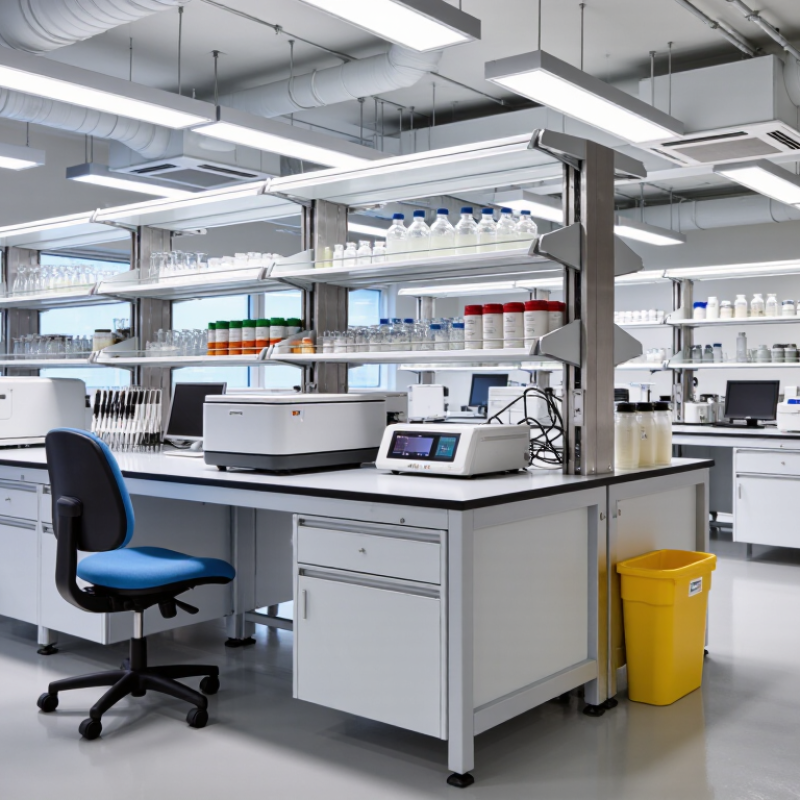
7 Tips for Choosing the Best Lab Workstations

Define Laboratory Tasks and Workflow Requirements

7 Tips for Choosing the Best Lab Workstations

Define Laboratory Tasks and Workflow Requirements

Tip 1: Observe the work before choosing the workstation. Record every action, from sample receipt to final documentation. Note where staff stand, reach, pause, and carry materials.

A molecular testing bench may need cleanable surfaces, instrument clearance, and separated preparation zones. A formulation area may require stronger support, ventilation access, and spill control. These needs should guide dimensions, storage, and electrical planning. Do not begin with appearance. Start with risk, movement, and task frequency.

Tip 2: Map the workflow in real conditions. Place paper labels, sample containers, tools, and waste bins on a temporary table. Watch for crossed paths and repeated reaching. Small delays become tiring during a long shift. They can also increase handling errors.

Tip 3: Ask laboratory staff to test the proposed layout. Their practical experience often reveals problems that drawings miss. One technician may need adjustable height for microscopy. Another may need knee clearance while using a seated analyzer. Accessibility matters, too. A workstation should support different users, protective equipment, and changing procedures.

Document load requirements, cleaning methods, utility connections, and future equipment needs. Standards and internal safety procedures should influence the final specification. Be careful with assumptions. A layout that works today may fail after one new instrument arrives. That possibility deserves honest review before purchasing.


7 Tips for Choosing the Best Lab Workstations: Define Laboratory Tasks and Workflow Requirements

Work-surface depth should match the task, equipment footprint, and reach requirements. Precision tasks such as microscopy and pipetting typically need shallower surfaces for better ergonomics, while sample preparation and equipment operation require deeper surfaces for instruments, materials, and safe clearance.

Evaluate Workstation Materials, Durability, and Chemical Resistance

7 Tips for Choosing the Best Lab Workstations

Evaluate Workstation Materials, Durability, and Chemical Resistance

Tip 1: Start with the work surface.

High-pressure laminate suits many general laboratories, while stainless steel handles heat and frequent cleaning better. Phenolic resin can resist many acids, solvents, and stains. However, no surface resists every chemical. Check a current compatibility chart before ordering.

Tip 2: Match the material to real tasks.

A workstation for weighing powders needs a stable, low-vibration top. One used for heated glassware needs strong thermal resistance. Look for sealed edges and rounded corners. They reduce moisture entry and simplify cleaning. I once underestimated edge protection, and swelling appeared near a sink within months.

Tip 3: Test durability beyond appearance.

Inspect frame joints, adjustable feet, drawer runners, and load ratings. A heavy instrument can slowly distort a weak cabinet. Ask for documented test methods, not vague claims. Chemical resistance also depends on concentration, temperature, exposure time, and cleaning habits.

Tip 4: Consider daily maintenance.

Smooth, nonporous surfaces usually support faster decontamination. Avoid deep seams where droplets can collect. Request sample panels when possible. Place common reagents on them for controlled testing, following approved safety procedures. This small trial may reveal staining that a brochure misses.

Tip 5: Think about future changes.

Modular workstations can adapt when equipment grows or workflows shift. Yet movable parts may reduce rigidity. That trade-off deserves honest review. Record the chemicals, heat sources, and equipment weights used in each area before making a final decision.

Select the Right Layout, Size, and Storage Capacity

7 Tips for Choosing the Best Lab Workstations

Select the right layout before measuring cabinets. A straight layout suits narrow rooms and supports simple workflows. L-shaped benches create separate zones for preparation and analysis. Island layouts improve access but require wider circulation paths. NIH’s Design Requirements Manual emphasizes clear movement, service access, and safe equipment placement. Measure door swings, utility drops, and emergency routes first.

Size should follow real tasks, not appearance. Leave enough depth for instruments, cable bends, and hands-on work. A 1,500-millimeter bench may feel generous, yet large centrifuges can quickly consume it. The U.S. Bureau of Labor Statistics recorded 946,290 musculoskeletal-disorder cases involving days away from work in 2023. Adjustable heights, reachable storage, and neutral working positions deserve serious attention. Small details matter.

Storage capacity needs evidence. Record current supplies, then add space for growth and waste separation. Keep daily-use items between waist and shoulder height. Reserve lower cabinets for heavier containers. The 2024 JLL Life Sciences Research and Development Outlook notes that laboratory construction costs can exceed 1,000 dollars per square foot in major markets. Poor planning becomes expensive. I have seen teams overbuy fixed cabinets, then lose valuable flexibility. That choice looked efficient. It was not. Mobile units and modular shelves may support future changes, though they can reduce visual neatness and require stronger organization.

Check Ergonomics, Utilities, Safety, and Compliance Features

7 Tips for Choosing the Best Lab Workstations

Check Ergonomics, Utilities, Safety, and Compliance Features

A strong laboratory workstation should fit the person, not force the person to adapt. Adjustable work surfaces, supportive seating, and clear legroom reduce awkward reaches during repetitive tasks. The U.S. Bureau of Labor Statistics reported about 2.6 million nonfatal workplace injuries and illnesses in private industry during 2023. Ergonomics cannot prevent every incident, but it can reduce daily strain and improve consistent performance.

Inspect utilities closely. Confirm that electrical outlets, data ports, gas lines, drainage, and ventilation match the equipment used at the station. Keep cables organized and leave service access beneath benches. A fume hood should support safe airflow, while emergency eyewash and shower equipment should remain visible and unobstructed. OSHA laboratory guidance emphasizes accessible emergency controls and proper hazard management. Small layout errors matter.

Safety features need documented evidence, not attractive claims. Check load ratings, chemical resistance, rounded edges, grounding, and fire-resistant materials. Review relevant requirements, such as ANSI/ASSP Z358.1 for emergency eyewash and shower equipment, with qualified safety personnel. Compliance depends on installation and maintenance too. A certified component cannot compensate for poor training. The BLS data also reminds us that routine work still carries measurable risk.

I have seen teams prioritize appearance over reach distance. That choice ages badly. A perfect checklist can still miss a blocked shutoff valve or a worker’s uncomfortable posture. Test the workstation with real users, real containers, and realistic movements before approving it.

7 Tips for Choosing the Best Lab Workstations - Check Ergonomics, Utilities, Safety, and Compliance Features

No. Selection Dimension What to Check Practical Evaluation Criteria Why It Matters Verification
1 Ergonomic Adjustability Review work-surface height, seated and standing compatibility, legroom, reach distance, and adjustment controls. The surface should support a neutral posture, allow sufficient knee and foot clearance, and keep frequently used items within a comfortable reach zone. Adjustable features should be easy to operate without tools. Good ergonomics help reduce awkward postures, repetitive strain, fatigue, and errors during extended laboratory work. Conduct a user trial with representative staff and compare the design with ergonomic guidance such as ISO 6385 principles.
2 Utility Integration Check locations and capacity for electrical outlets, data connections, water, drainage, compressed air, gases, vacuum, and other required services. Utilities should be accessible without creating trip hazards, positioned away from splash zones where appropriate, and sized for the equipment load. Flexible connections should not obstruct work areas. Well-planned services improve workflow, simplify maintenance, and reduce unsafe temporary cables, hoses, and adapters. Compare the workstation layout with the equipment schedule, electrical load calculation, plumbing plan, and facility utility requirements.
3 Chemical and Material Resistance Evaluate resistance to the specific acids, bases, solvents, stains, disinfectants, heat, and mechanical wear used in the laboratory. Select surfaces with documented compatibility for the actual chemicals and temperatures. Edges, seams, sinks, and exposed hardware should resist liquid penetration and corrosion. Compatible materials preserve the work surface, prevent contamination traps, and lower replacement and maintenance costs. Review chemical-resistance charts, safety data sheets, and written test information for the intended substances.
4 Safety and Hazard Control Look for spill containment, stable construction, rounded or protected edges, cable management, emergency access, and compatibility with local ventilation systems. The design should not block emergency equipment, exits, eyewash stations, safety showers, or ventilation paths. Heavy equipment must be supported against tipping and vibration. A workstation should control foreseeable hazards rather than introduce new collision, electrical, chemical, fire, or manual-handling risks. Perform a documented risk assessment using the laboratory’s chemical hygiene plan and applicable workplace-safety requirements.
5 Cleanability and Contamination Control Inspect joints, seams, backsplashes, sink interfaces, drawer interiors, and surfaces for cleanability and resistance to repeated decontamination. Prefer smooth, non-porous, low-absorption surfaces with sealed joints and minimal dust- or liquid-trapping gaps. Confirm compatibility with the approved cleaning and disinfecting agents. Easy-to-clean construction supports hygiene, sample integrity, infection-control practices, and efficient housekeeping. Review cleaning procedures, inspect a physical sample, and test representative cleaning agents before final selection.
6 Load Capacity and Stability Confirm capacity for instruments, shelving, storage contents, sinks, users’ working loads, and dynamic loads caused by equipment operation. Use documented load ratings for the complete assembly, not only individual components. Check leveling, anchoring, vibration control, and clearance for maintenance. Adequate stability protects equipment, improves measurement reliability, and reduces tipping, vibration, and structural failure risks. Compare calculated loads with manufacturer test data and have structural or facilities personnel review unusual loads.
7 Compliance and Lifecycle Support Check relevant building, electrical, fire, accessibility, ventilation, chemical-safety, and laboratory-furniture requirements, plus installation and maintenance support. Documentation should identify materials, load ratings, utility requirements, cleaning limits, inspection guidance, replacement parts, and installation responsibilities. Compliance documentation reduces approval delays and helps the workstation remain safe and serviceable throughout its useful life. Obtain written review from facilities, environmental health and safety, accessibility, and fire-safety personnel before purchase.

Note: Final requirements should be confirmed against the laboratory’s hazard assessment, local building and fire codes, electrical regulations, accessibility rules, ventilation design, and applicable occupational-safety standards.

Compare Customization, Maintenance, Warranty, and Total Cost

7 Tips for Choosing the Best Lab Workstations

Compare Customization, Maintenance, Warranty, and Total Cost

A good laboratory workstation should fit the work, not merely fill a room. Measure instrument footprints, operator reach, cable paths, and clearance for service access. Adjustable shelves, reinforced tops, and removable panels can support changing equipment. I once selected a compact bench that looked efficient. Later, technicians struggled to reach a rear connection. The mistake was small, but disruptive.

Customization should also include utilities. Check electrical loads, sink placement, ventilation needs, and chemical-resistant surfaces. Ask whether modifications can be made without replacing the entire frame. Standard parts may simplify future repairs. However, excessive customization can create expensive, uncommon components. That trade-off deserves a written review.

Maintenance affects performance long after installation. Examine cleaning procedures, replacement-part availability, and inspection intervals. A workstation with sealed edges may resist spills better than one with exposed joints. Request service documentation, not vague assurances. Warranty terms need equal attention. Confirm coverage periods, labor exclusions, response times, and who handles on-site repairs. A long warranty means little if shipping damage or improper installation is excluded.

Calculate total cost beyond the purchase invoice. Include delivery, assembly, utility connections, preventive maintenance, replacement parts, downtime, and future expansion. A cheaper workstation can become costly when one failed component pauses testing for two days. Ask for a five-year cost estimate. Then challenge its assumptions. Real laboratory use is rarely as predictable as a spreadsheet suggests.

Efficiency matters. So does recoverability.

Inquiry Form